
• Personal
    Pago Personal
    Account
    • Checking Account
    • Savings Account
    • Mastercard debit card
    Payments and transfers
    • QR Payments
    • Payment of bills and subscriptions
    • Receive and send money
    Paga me Pago
    • What is Paga me Pago?
    • Merchants network
  • Business
    Pago Business
    Account
    • Checking Account
    • Pago Business Card
    Receive payments
    • QR Payments
    • Card payment (POS)
    • Payment by link
    • E-commerce
    • Pago OmniChannel
    Pay
    • Fiscalized invoices
    • Utility bills and subscriptions
    • Salary
    Salary with Pago
    • Become part of the network
    Integration
    • devPOS
    • devPMS
  • Pago+
  • Help
  • Personal
      Pago Personal
      Account
    • Checking Account
    • Savings Account
    • Mastercard debit card
    • Payments and transfers
    • QR Payments
    • Payment of bills and subscriptions
    • Receive and send money
    • Paga me Pago
    • What is Paga me Pago?
    • Merchants network
  • Business
      Pago Business
      Account
    • Checking Account
    • Pago Business Card
    • Receive payments
    • QR Payments
    • Card payment (POS)
    • Payment by link
    • E-commerce
    • Pago OmniChannel
    • Pay
    • Fiscalized invoices
    • Utility bills and subscriptions
    • Salary
    • Salary with Pago
    • Become part of the network
    • Integration
    • devPOS
    • devPMS
  • Pago+
  • Help
  • Albanian
  • Personal
    Pago Personal
    Account
    • Checking Account
    • Savings Account
    • Mastercard debit card
    Payments and transfers
    • QR Payments
    • Payment of bills and subscriptions
    • Receive and send money
    Paga me Pago
    • What is Paga me Pago?
    • Merchants network
  • Business
    Pago Business
    Account
    • Checking Account
    • Pago Business Card
    Receive payments
    • QR Payments
    • Card payment (POS)
    • Payment by link
    • E-commerce
    • Pago OmniChannel
    Pay
    • Fiscalized invoices
    • Utility bills and subscriptions
    • Salary
    Salary with Pago
    • Become part of the network
    Integration
    • devPOS
    • devPMS
  • Pago+
  • Help
  • Personal
      Pago Personal
      Account
    • Checking Account
    • Savings Account
    • Mastercard debit card
    • Payments and transfers
    • QR Payments
    • Payment of bills and subscriptions
    • Receive and send money
    • Paga me Pago
    • What is Paga me Pago?
    • Merchants network
  • Business
      Pago Business
      Account
    • Checking Account
    • Pago Business Card
    • Receive payments
    • QR Payments
    • Card payment (POS)
    • Payment by link
    • E-commerce
    • Pago OmniChannel
    • Pay
    • Fiscalized invoices
    • Utility bills and subscriptions
    • Salary
    • Salary with Pago
    • Become part of the network
    • Integration
    • devPOS
    • devPMS
  • Pago+
  • Help
  • Albanian

Integration with devPOS

Pago offers three very valuable ways to integrate with the devPOS fiscalization system, to automate your sales and accounting processes.
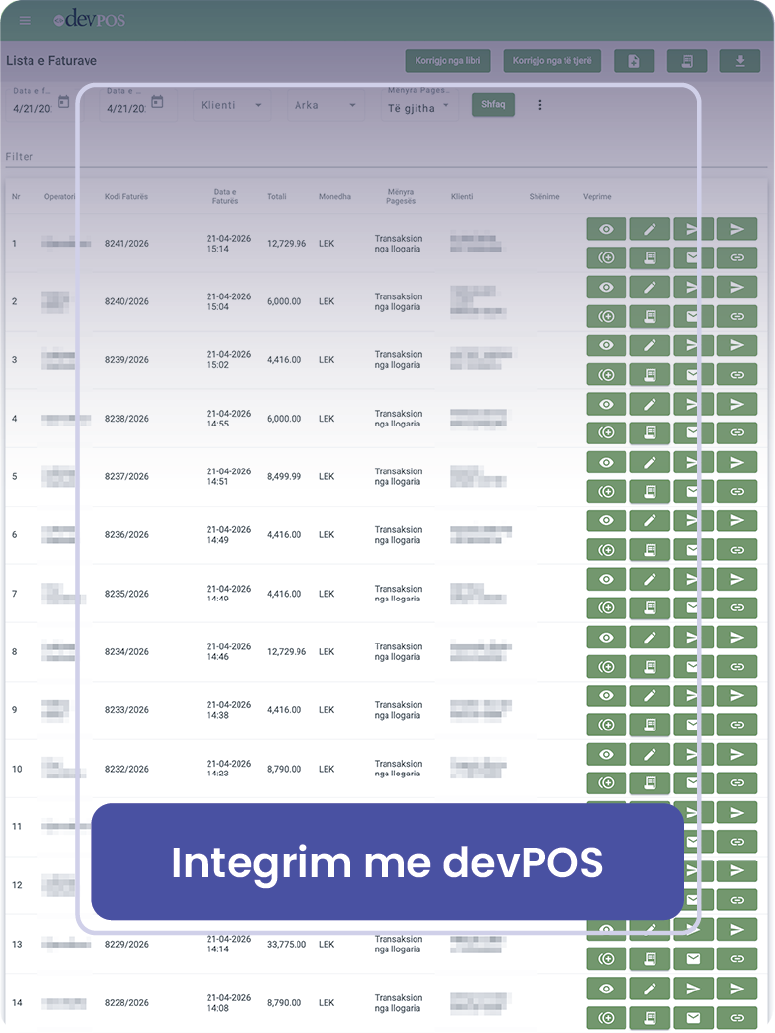
Ways of integration

Payment by link

By connecting your devPOS account to your Pago account, you can generate a payment link for each invoice that you can then share with your customers, to receive payment from them by debit or credit card, Mastercard or Visa with instant notification and crediting the funds to your account within a very short time.

devPOS ↔ POS

By connecting the devPOS system to your physical POS terminal, to automatically pass the invoice value and receive confirmation of the transaction before proceeding with its generation. Transaction data is stored in devPOS and can be transferred to devBooks, automating payment reconciliation.

All-in-one POS

An exclusive Pago-devPOS solution that enables the use of the POS terminal for both issuing invoices and accepting payments. This solution, ideal for small merchants, street vendors, transport and delivery services, offers convenience and reduced costs.

Payment of fiscalized invoices

Thanks to the integration with devPOS, you can display the list of your purchase invoices in your account in the Pago application, and from there, with two actions, pay them. Without having to scan the QR code of the invoice or manually copy its data, this functionality allows you to shorten the time of payment of an invoice from an average of 1 minute to 5 seconds. At the end of the payment, the system will automatically notify the tax system of the payment and the invoice will no longer appear in the list of unpaid invoices, giving you a clear overview of your obligations at all times. Click here to learn more.


Open a checking account

For Individuals

  • Paga me Pago
  • Mastercard debit
  • Payment of bills and subscriptions
  • Receive and send money

For Businesses

  • QR Payments
  • Card payment
  • Payment by link
  • E-commerce
  • Paga me Pago

About Us

  • Rubicon
  • Terms & Conditions
  • Fees and Commissions
  • Privacy Policy
  • Safety Tips
  • Contact

Download now

Pago is registered in Albania as a trademark of Rubicon Sh.a.

We are licensed (No. 52, dated 22.01.2022) by the Supervisory Council of the Bank of Albania as an electronic money financial institution.

© All rights reserved Rubicon 2025